Why Synchronization Is Not the Same as Backup
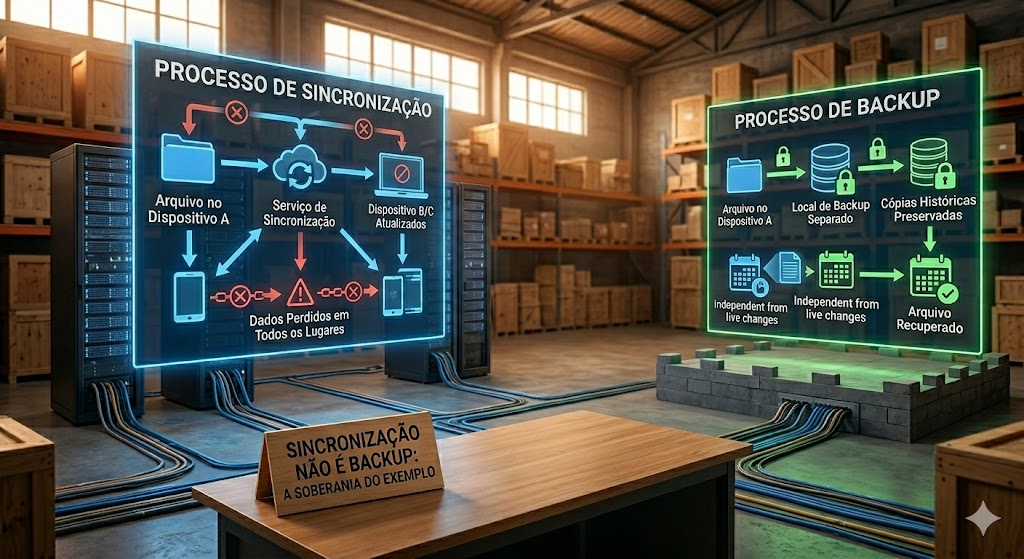
Imagem gerada por IA.
Many professionals rely on synchronization to keep their files seamless across devices. While sync offers undeniable convenience, it should never be mistaken for a true backup strategy. Confusing the two is a fundamental error that places your data sovereignty and critical work at risk.
We must understand what synchronization actually does. When you enable a sync offer, cloud service, or third-party utility, the software guarantees that files remain strictly identical on all connected devices. Any modification, whether intentional or catastrophic, is instantly propagated throughout your entire network. If you edit a document on your laptop, the change spreads everywhere; if you accidentally delete a folder on your phone, it vanishes from every other device in real time (or at the frequency you use to sync your data).
Because synchronization replicates everything, it also perfectly replicates mistakes, corruption, and threats. An overwritten file with outdated info, an encoding error that damages a spreadsheet, or a malicious ransomware attack that encrypts a directory will sync across your entire ecosystem. Sync ensures complete consistency, but when an error occurs, it simply means you are consistently distributing ruined data.
A true backup requires a completely different mindset. It is a separate, preserved snapshot of your data, insulated from immediate changes in your live working environment. You don't necessarily need complex enterprise software to build a robust foundation for data preservation. An effective strategy can be remarkably straightforward.
At regular intervals, copy your entire set of files to a completely separate location, such as a dedicated directory or an external drive. Explicitly rename the copy with the specific date of execution, maintaining multiple dated snapshots so you can easily roll back to an exact point in time if something goes wrong. Crucially, keep at least one of these historical copies entirely offline, completely disconnected from your active network, to neutralize synchronized corruption or ransomware.
Ultimately, data sovereignty isn't about the tools you buy, but how you manage the fundamentals. Synchronization is designed to manage the present moment, while backup is designed to preserve your history. As leaders, understanding this distinction ensures that when the unexpected happens, your team isn't left scrambling for missing data, but instead executing a clear recovery plan from an untouched, secure foundation.