Connecting information and notes

Obsidian can connect notes by using tags, folders, or links. Below I explain how I use these three methods and how I see them in regard to usability. Some methods provide more relevant / strong connections than other methods, but all three are useful.
Vault
This is where your notes live. You can have a single vault or multiple vaults, but you can only work with one vault at a time. It is nothing but a folder with all of your files and some special folders for plugins, themes, CSS customizations, etc.
You can’t link notes in different vaults without a lot of effort using Obsidian URIs or the community plugin Advanced URI. Even then, these links are prone to break depending on the changes you do at the other vault.
Folders
Folders group your notes per similarity. Each note can only live in one folder.
Folders are usually related to something specific such as your family, a school subject or a project.
They should be applied as context and not only as some kind of hierarchy. Contexts will help reduce the cognitive load to find out where each note should go. So, you have a “Family” context, a “Management” context, etc. And you have some subfolders with some specialization on the context: “Family/Trips”, “Management/Knowledge”, “Management/Finance”, etc.
Folders create some hierarchy as well.
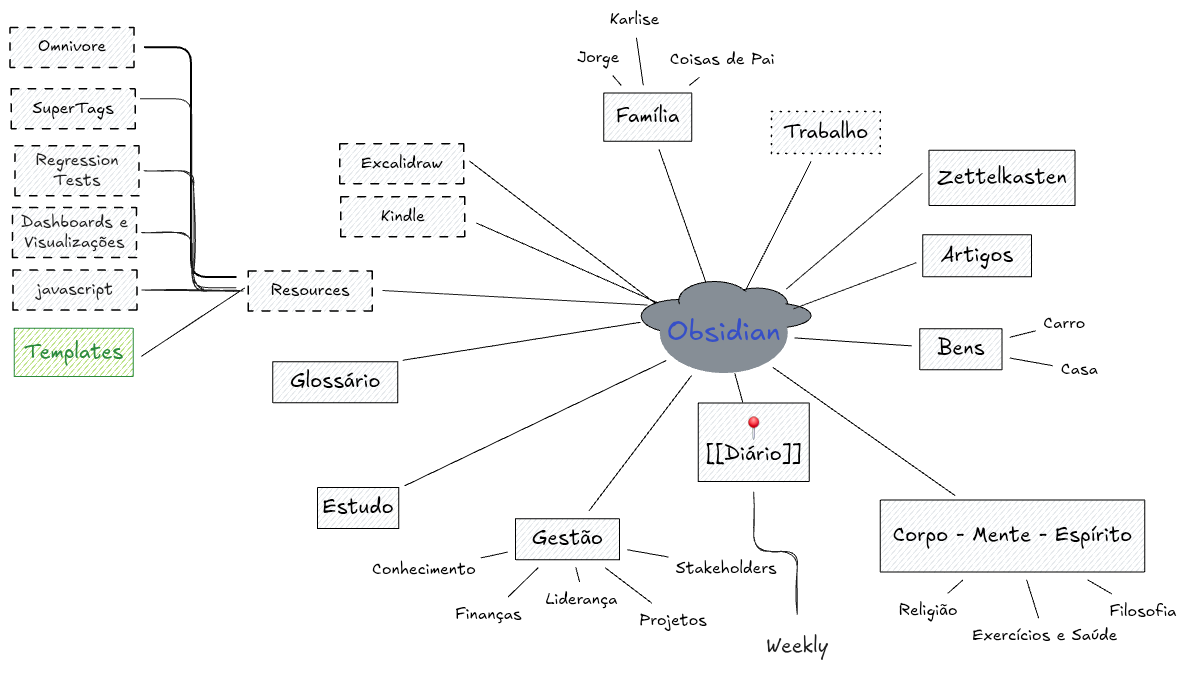
Different from tags, a note can only live in a single folder. As those two aren't mutually exclusive, they can be combined to provide more complex information such as the grouping provided by folders and using tags for status in a project note.
Tags
This is the loosest connection. Tags can be used for generic things, topics, or note status (todo, done, forwarded, inprogress, etc.).
Don't overthink them as you can create properties for things like note type, categories, etc.
Tags are what you usually use on social network to bind your posts together: “what is everything I posted with #fun?” — this is a tag. It is a box where you throw things inside of it and when you want something you get the whole box and start looking at things one by one to find what you need.
There's no relationship between notes besides having the same tag. It has no additional context, no extra information on why these notes have that tag.
A note can have as many tags as required and these can be part of your note text or be part of the note frontmatter.
It is important to know that tags are not specific to text blocks: they always apply in the context of the entire note. For example, if you filter with tags, you'll get a reference to the note that contains the tag and not to the specific block that has it. (To go to specific blocks, you can link to them, as explained in Obsidian's official documentation.)
One interesting plugin to help with tags is the Tag Wrangler community plugin. It is worth checking it out.
Also check Why nested tags are not that good, for an opinion about using nested — or hierarchical — tags in your notes.
Links
These are the strongest connection between notes because it is what provides more context about why the notes are connected.
Linking notes creates hierarchical or lateral connections between your notes. (See this idea compass + Excalibrain video for how to visualize these connections.)
You can develop the linking process via Semantic linking, where linked notes have relationships between them and these can be documented as properties or as part of the link itself.
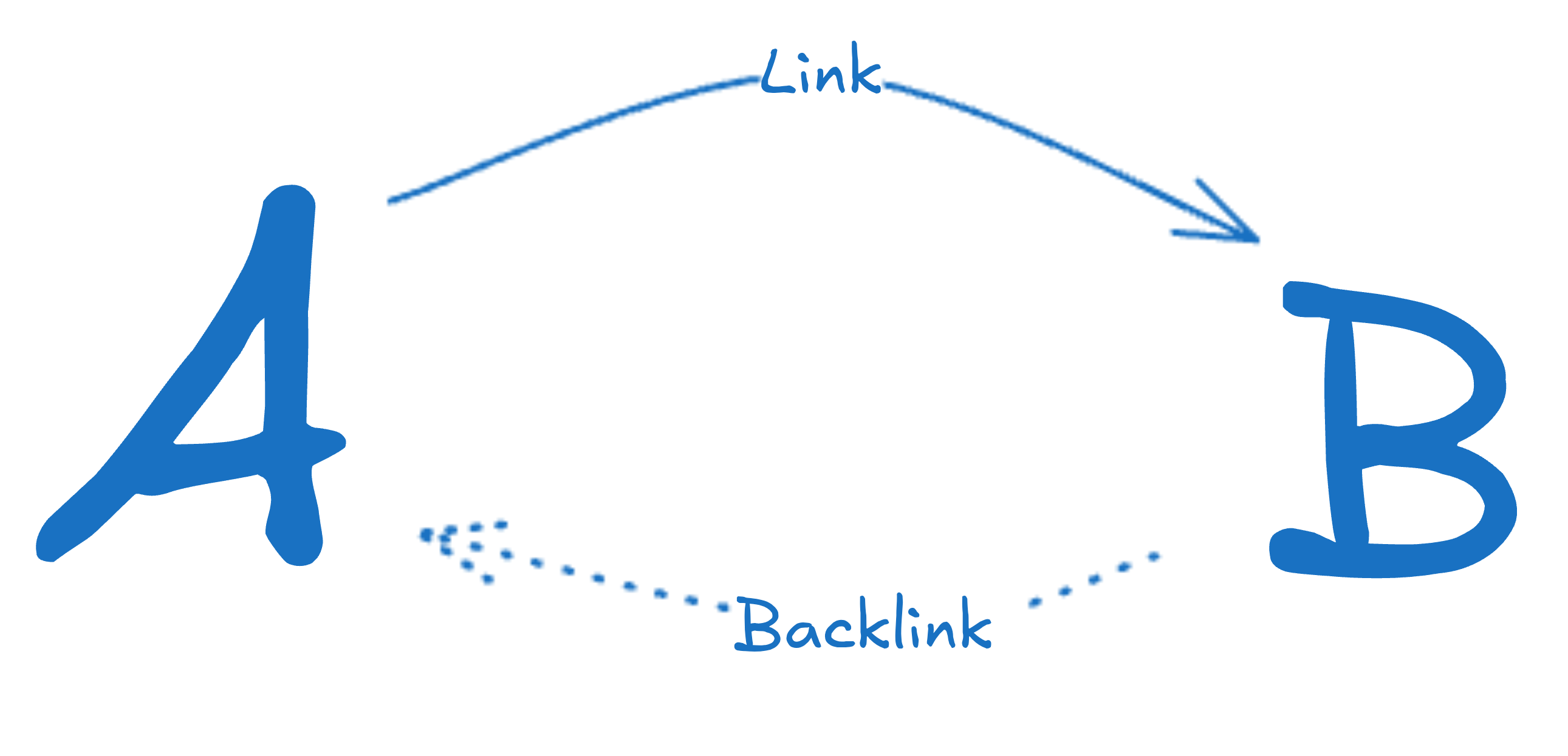
In Obsidian (and some other tools), linking from A to B will let B automatically knows A mentioned it and will show you that. Obsidian uses the backlinks core plugin for that visualization, but the feature is inherent to the tool and even if you don't see it, it is there.
There are common Patterns to make linking easier, leveraging on them and specially linking the ideas in the note, will make them more useful and increase their value.
Links and properties
By using links and note properties it is possible to generate more complex relationships and hierarchies.
With the right taxonomy, one can represent that a note links to another note in a supporting relationship, i.e., the other note supports the contents of the current note. The same can be done for an opposing relationship, where the other note opposes to the arguments on the current note.
Properties can also represent hierarchies, where one note is a parent to a child note in the sense that the ideas from the parent note gave origin to the child note. This can be seen at Semantic linking.
Summary
Imagine that your vault is a wardrobe.
Folders, then, are like drawers in it. You can only put clothes in one drawer at a time. When you search in a drawer, you get a group of things inside that drawer.
Tags are the equivalent of the color of clothes and shoes, such as black. When you search for a tag, you get a group of things tagged with that tag. When you search for your #black tag, you’ll get everything: clothes, shoes, belts, pencils, pens, etc. Everything inside that wardrobe that has that tag will be returned.
And, finally, links create connections. The blue sock that I've used at my best friend's wedding. You're connecting things (the socks, the friend, and the wedding) creating a relationship between them.
Folders and tags group things. Links connect.